Adoption Health and the Engagement score
Last verified 2026-09-28
Track customer adoption health across four independent dimensions, monitor 90-day engagement signals, and evaluate responsiveness, tone, and meeting participation.
Before you start
- ValueRamp CSM, Admin, or OM role
- Access to an account in the Adoption phase
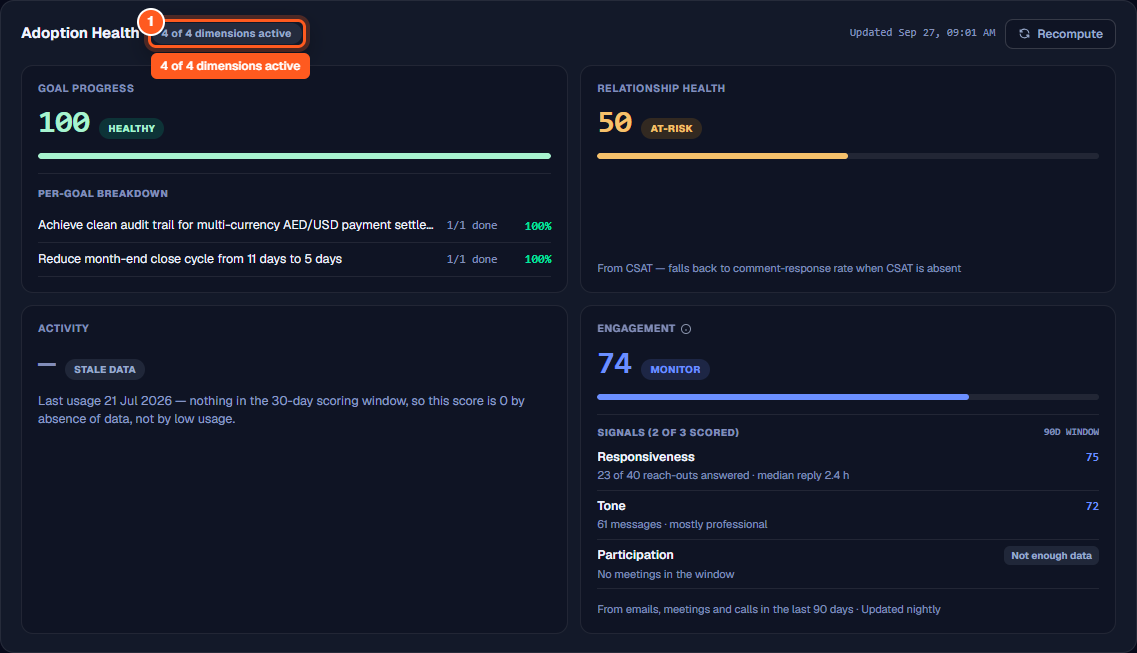
The Adoption Health panel on the account overview page (/accounts/[id]) tracks customer progress across four distinct operational dimensions once an account enters the Adoption phase.
Rather than collapsing diverse telemetry into an opaque single score, ValueRamp presents four discrete dimensions side by side: Goal Progress, Relationship Health, Activity, and Engagement. There is no overall composite score combining them.
The four dimensions of Adoption Health
Each tile measures a distinct aspect of customer success:
- Goal Progress: Tracks completion across adoption-oriented milestone goals linked to customer plans.
- Relationship Health: Comes from CSAT. When the account has no CSAT, it falls back to the comment-response rate.
- Activity: Scores product usage over the last 30 days: how recently the product was used, how many of your mapped features were used, and how many usage events arrived. The tile shows Stale data when no usage arrived in that window, and Not measured when no usage data has ever arrived.
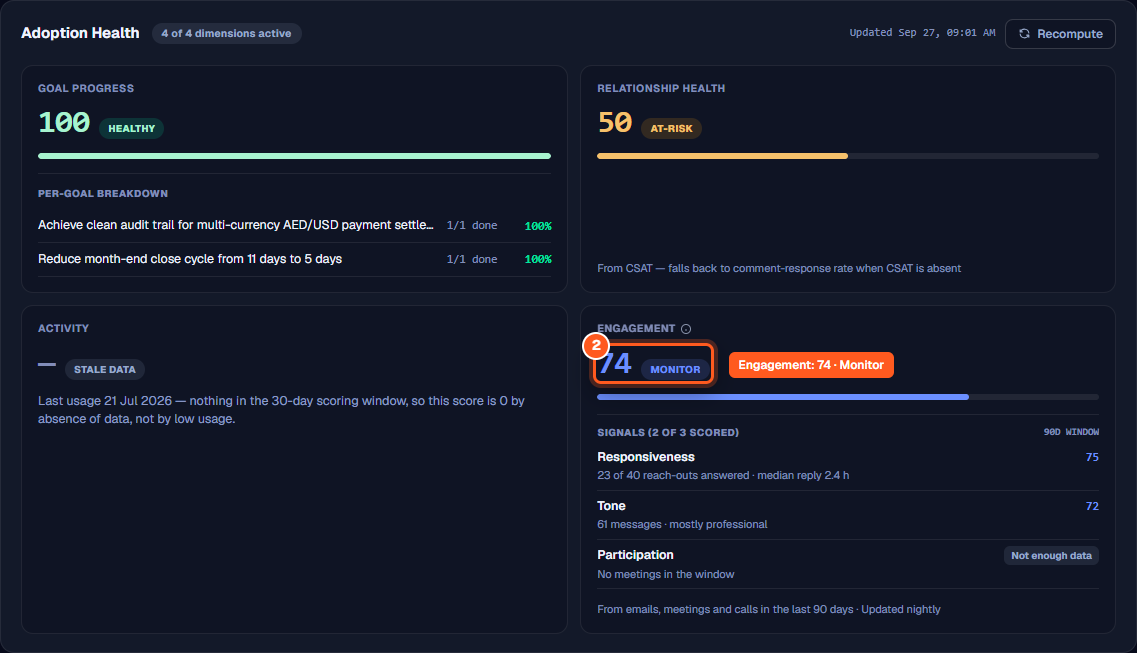
- Engagement: How the customer is connecting with you: responsiveness, tone and meeting participation over a rolling 90-day window.
The card header shows a 4 of 4 dimensions active chip. It means each dimension is live; not every account has data for all four.
How the Engagement score works
The Engagement tile captures how actively the customer is connecting with your team across communication channels.
Rolling 90-day evaluation window
Engagement is recomputed automatically during nightly background refreshes, aggregating signals across emails, scheduled calendar meetings, and call transcripts recorded over the previous 90 days.
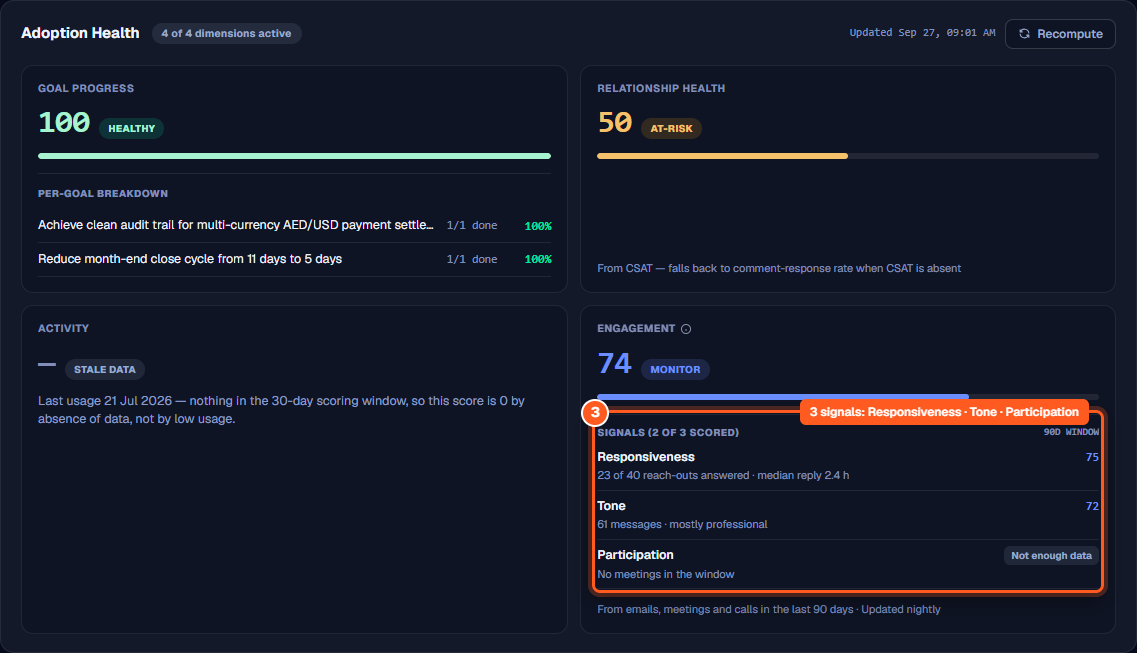
Three core signals (0–100)
- Responsiveness: How quickly and consistently the customer responds when your team reaches out by email. If your team reaches out to the same person several times on the same day, those reach-outs count once, from the first.
- Tone: Natural language sentiment analysis evaluating the tone of incoming customer messages and communications.
- Participation: Customer attendance and engagement in scheduled meetings. Only qualified meetings count—specifically, calendar events with at least one person from your side and at least one person from the customer. All-day calendar entries and internal-only holds are excluded.
[!NOTE] Unscored metrics: Neither "conversations the customer started" nor "last seen" are factored into the Engagement score. Only the three qualified signals above are scored.
The two-signal scoring threshold
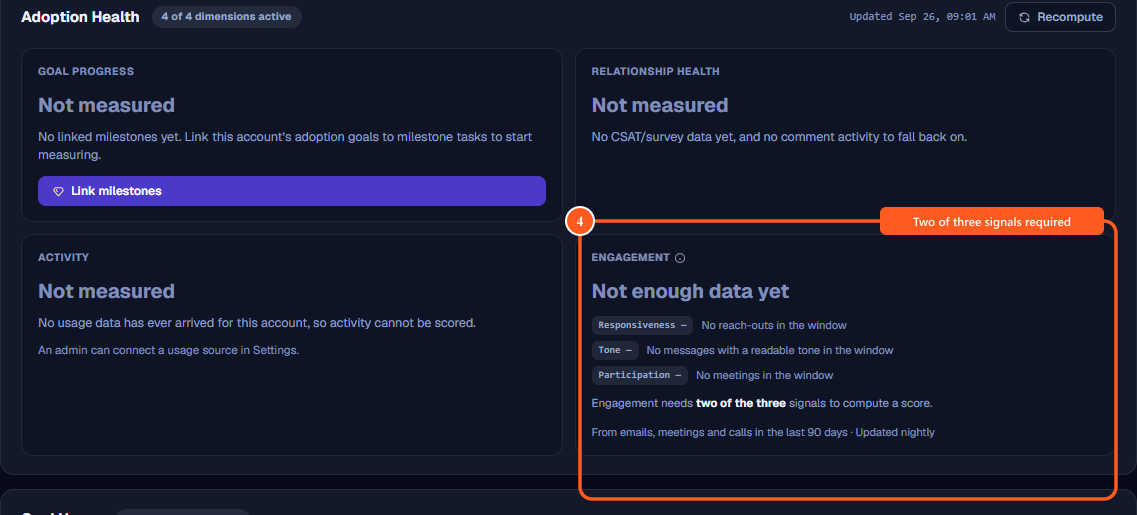
Engagement needs data for at least two of the three signals before it shows a score.
- If fewer than two signals have qualifying data, the tile reports Not enough data yet and details which signals were captured.
- Other tile states include Not measured yet (displayed prior to the initial nightly refresh, noting that scoring begins from tonight's refresh onwards) and No health score yet (for newly initialized accounts that have not been scored).
Health score bands
When a numerical score (0–100) is computed for Engagement or other adoption dimensions, it maps to ValueRamp's standard status bands:
- Healthy (80–100)
- Monitor (60–79)
- At-Risk (40–59)
- Critical (20–39)
- Churning (below 20)
Lifecycle activation and on-demand refresh
- Adoption phase requirement: Adoption Health is tailored specifically for the post-onboarding lifecycle. On accounts currently in the Onboarding phase, the panel indicates that adoption health activates automatically once the account enters the Adoption phase.
- On-demand recompute: Admins, CSMs, and Onboarding Managers can click the Recompute button in the card header at any time to recalculate adoption dimensions and refresh scores immediately.
Steps
Inspect the Adoption Health panel and active scoring dimensions on the account overview
Review the measured Engagement score and Monitor health band
Evaluate the 90-day signal breakdown for Responsiveness, Tone, and Participation
Review the 'Not enough data yet' state when fewer than two signals are scored
Monitor adoption readiness for accounts progressing through onboarding

Common questions
What four dimensions make up Adoption Health?
How is the Engagement score calculated?
Why does the Engagement tile display 'Not enough data yet'?
What other uncalculated states can the Engagement tile display?
What score bands are used across Adoption Health dimensions?
When does Adoption Health become available on an account?
Was this helpful? Tell us what was missing