The ARR ledger
Last verified 2026-09-18
Audit every recurring revenue movement in your workspace, see net change quarter-to-date and year-to-date, and filter by event type.
Before you start
- ValueRamp Finance role
The ARR Ledger (/finance/arr-ledger) is ValueRamp's immutable audit log for recurring revenue. Every contract change—whether an initial sale, an account expansion, a renewal renegotiation, a contraction, or a customer churn—is stamped with its before-and-after ARR values and the net financial delta.
Key capabilities
- Immutable revenue history: Track every recurring revenue transition across the workspace from contract inception to renewal or churn.
- Fiscal performance summaries: Monitor Net ARR Change · QTD and Net ARR Change · YTD — quarter and year run from the workspace's financial year start (Settings → Organisation).
- Granular movement categorization: Filter records by type (the types present in your ledger, from initial, expansion, upsell, cross_sell, renewal, contraction, churn, churn_recovery, correction).
- Attribution & ownership tracking: Correlate ARR transitions with account names, assigned CSMs, and recording user emails.
- Normalized base currency accounting: Review all financial deltas in standardized USD, eliminating currency fluctuation ambiguities across global accounts.
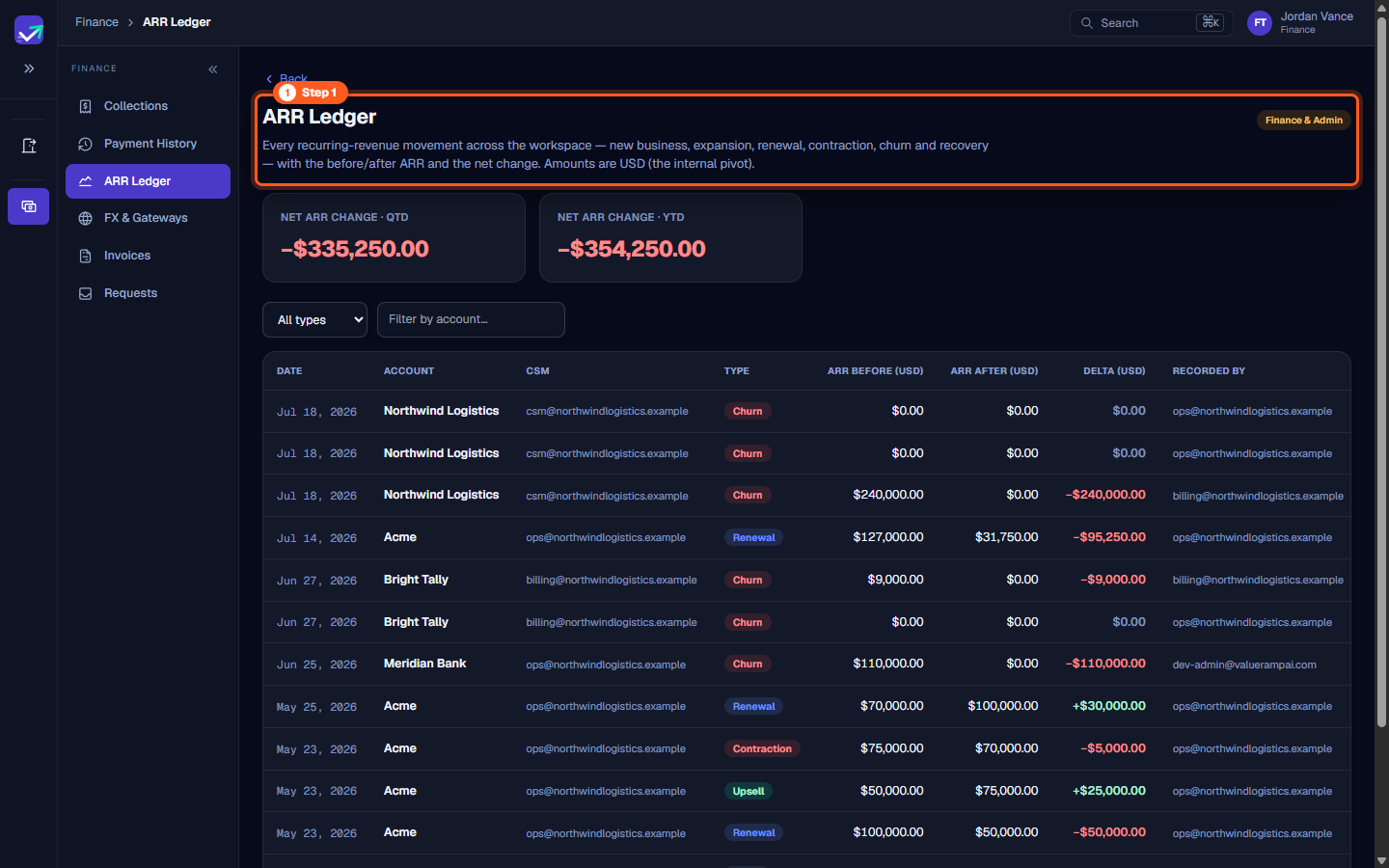
Step 1: Open the ARR Ledger
- In the sidebar under Finance, select ARR Ledger (
/finance/arr-ledger). - The page header indicates Finance & Admin clearance and explains:
"Every recurring-revenue movement across the workspace — new business, expansion, renewal, contraction, churn and recovery — with the before/after ARR and the net change. Amounts are USD (the internal pivot)."
- Use this page to audit monthly revenue recognition and explain movements between beginning and ending ARR.
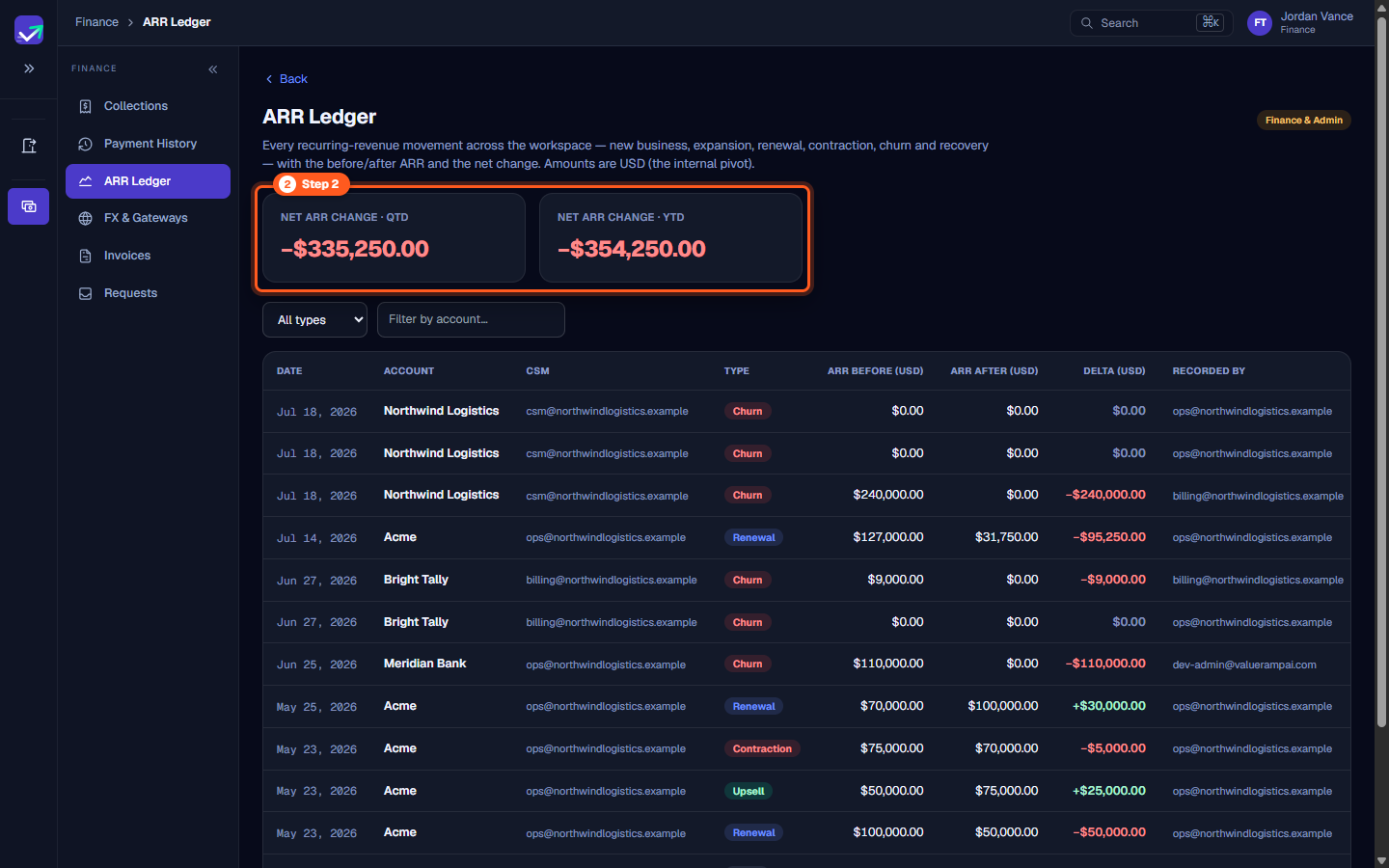
Step 2: Review Net ARR performance cards
- Inspect the two top-level summary metric cards:
- NET ARR CHANGE · QTD: The net change in ARR since the start of the current financial quarter (e.g.,
−$335,250.00). - NET ARR CHANGE · YTD: The net change in ARR since the start of the financial year (e.g.,
−$354,250.00). Both follow the financial year start set in Settings → Organisation.
- NET ARR CHANGE · QTD: The net change in ARR since the start of the current financial quarter (e.g.,
- These figures aggregate all positive additions (new logos, expansions) against negative deductions (contractions, cancellations).
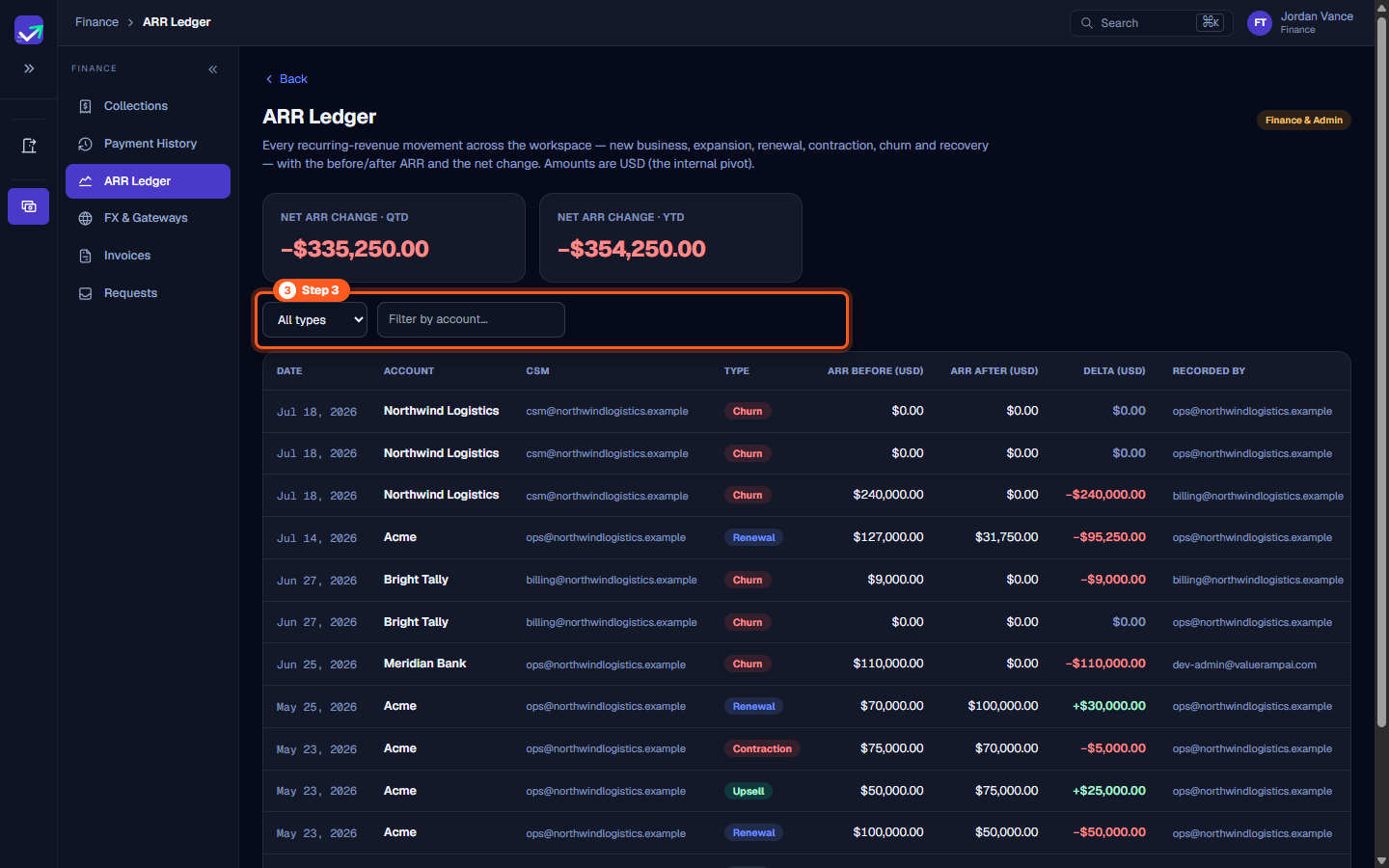
Step 3: Filter ledger records by movement type and account
- Positioned above the ledger table, use the filter toolbar to isolate specific revenue transactions:
- Type dropdown: All types, or one of the types present in your ledger —
initial,expansion,upsell,cross_sell,renewal,contraction,churn,churn_recovery,correction. - Filter by account or CSM...: Type a client name (e.g.,
Northwind Logistics,Acme) or CSM email to audit specific accounts.
- Type dropdown: All types, or one of the types present in your ledger —
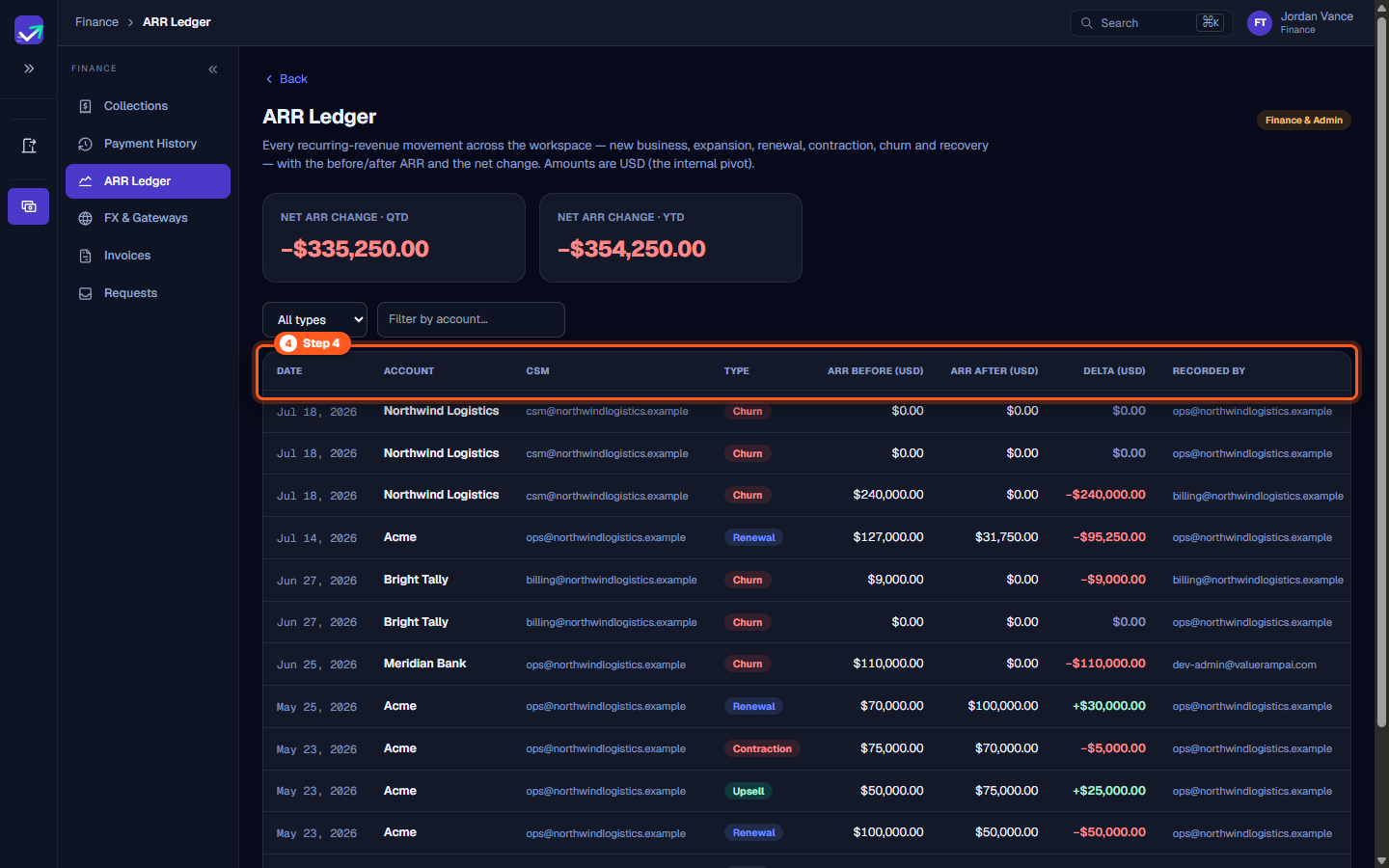
Step 4: Examine ledger column structure
- Review the columns of the ARR movement ledger table:
- DATE: The effective date of the revenue transition.
- ACCOUNT: The customer organization.
- CSM: The assigned Customer Success Manager.
- TYPE: The movement type badge.
- ARR BEFORE (USD): The account's contracted ARR prior to the event.
- ARR AFTER (USD): The account's revised ARR following the event.
- DELTA (USD): The exact net impact on workspace ARR.
- RECORDED BY: The team member who recorded the movement.
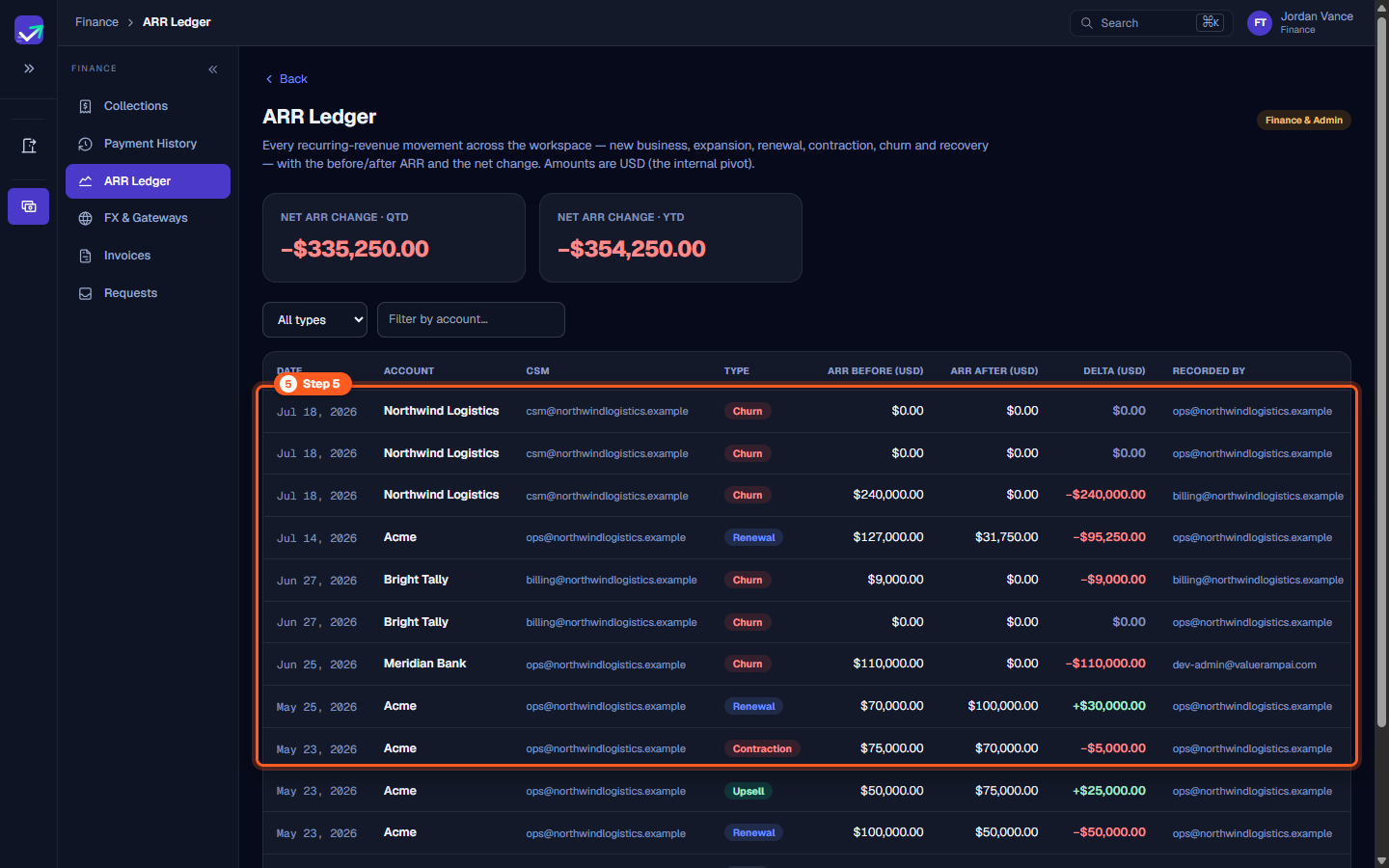
Step 5: Audit revenue movements and delta impacts
- Each row in the ledger provides full transparency into contract changes:
- Churn entries: Show previous ARR reducing to
$0.00with a negative red delta (e.g.,−$240,000.00). - Renewal adjustments: Display contract value renegotiations (e.g.,
$127,000.00renewed to$31,750.00, a−$95,250.00delta). - Expansion additions: Highlight positive green deltas that expand customer commitments.
- Churn entries: Show previous ARR reducing to
- Cross-reference these rows with billing schedules in Collections to ensure recognized ARR matches invoicing terms.
Steps
Open the ARR Ledger to audit recurring revenue events across all workspace accounts
Review summary KPI cards for net ARR change quarter-to-date and year-to-date
Filter revenue movements by transaction type or search by account or CSM name
Inspect movement ledger table columns and transition tracking fields
Analyze baseline ARR, post-transition ARR, and net revenue deltas per account
Common questions
What revenue movement types are tracked in the ARR Ledger?
What currency are ARR Ledger figures reported in?
How are ARR deltas calculated on renewal events?
Who records transactions in the ARR movement ledger?
Was this helpful? Tell us what was missing