Connect usage data for an account
Last verified 2026-09-17
Connect product usage sources, reconcile external account IDs, map feature keys to adoption goals, and track customer usage signals on account records.
Product usage data is essential for measuring customer adoption, calculating Time to First Value (TTFV), and detecting disengagement before it turns into churn.
ValueRamp ingests raw telemetry events from databases, tokenized APIs, and cloud storage drops, normalizes the event stream, and reconciles external customer identifiers to your ValueRamp accounts.
This guide walks through configuring usage sources, mapping feature keys, reconciling held external IDs to accounts, and tracking usage metrics on the account overview.
How usage data flows into ValueRamp
- Ingestion & Normalization: Telemetry lands via database replicas, REST API calls, CSV drops, or warehouse syncs. Every event carries a timestamp, an external account identifier, and an event key.
- Feature Mapping: Event keys (such as
api.queryorreport.view) are auto-discovered and cataloged. Admins can assign user-friendly display names and tie events directly to customer success goals. - Account Reconciliation: Incoming identifiers that do not yet match a ValueRamp account are placed into a Held state. Once an admin maps the ID to an account, all held events and subsequent syncs automatically attribute to that customer record.
- Adoption & Health Rollup: Attributed usage feeds account-level metrics, including Adoption Health scores, Time to Value benchmarks, and automated AI Adoption Briefs.
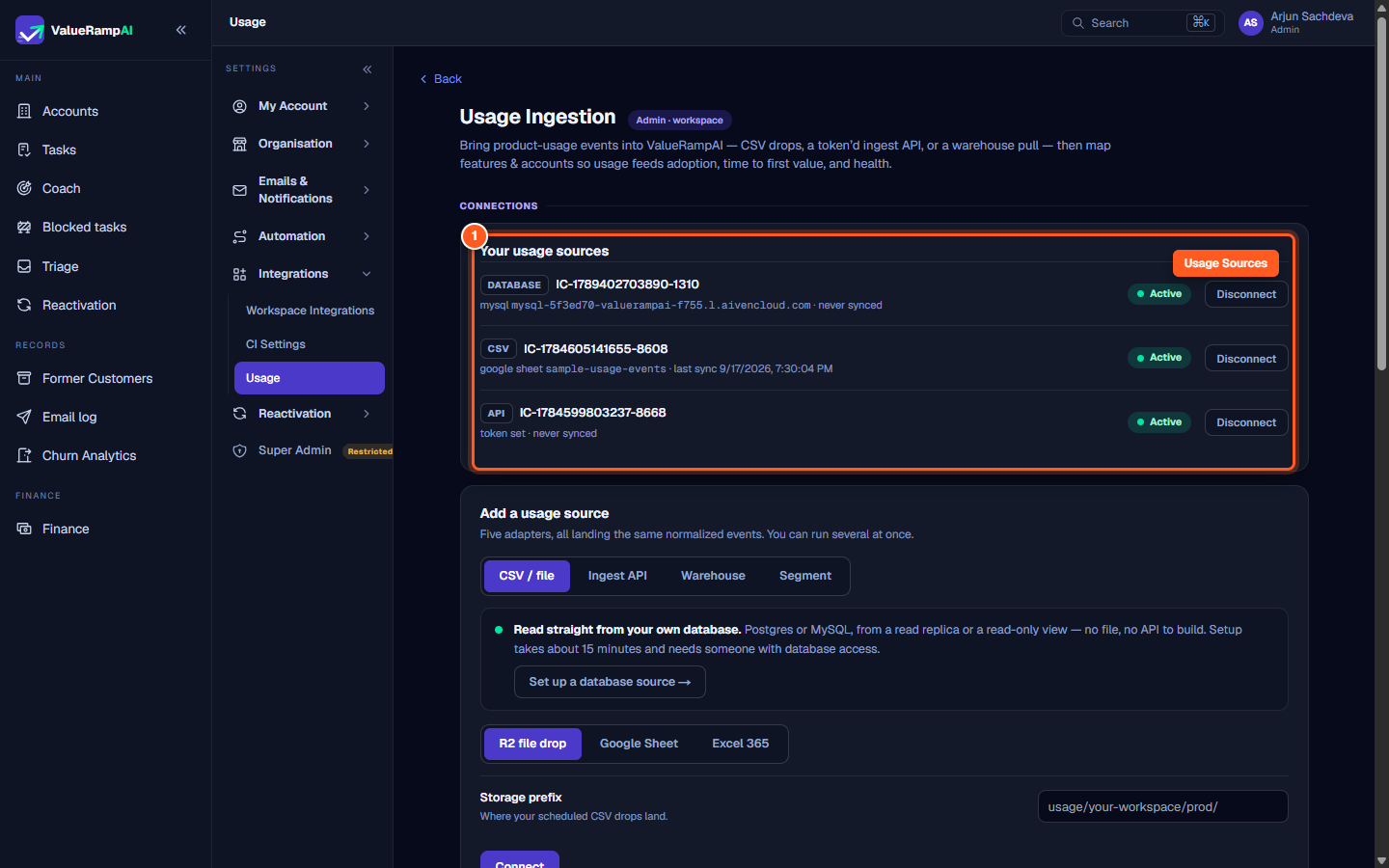
Step 1: Review connected usage sources and database connections
- In the left navigation sidebar under Settings, click Usage (
/usage-ingestion). - The Connections section displays all configured data pipelines:
- Database: Connects directly to a read-only Postgres or MySQL replica.
- CSV / File: Scheduled drops from Cloudflare R2, Google Sheets, or Excel 365.
- Ingest API: Tokenized endpoint for pushing real-time product events.
- Verify that your primary data pipeline is marked Active.
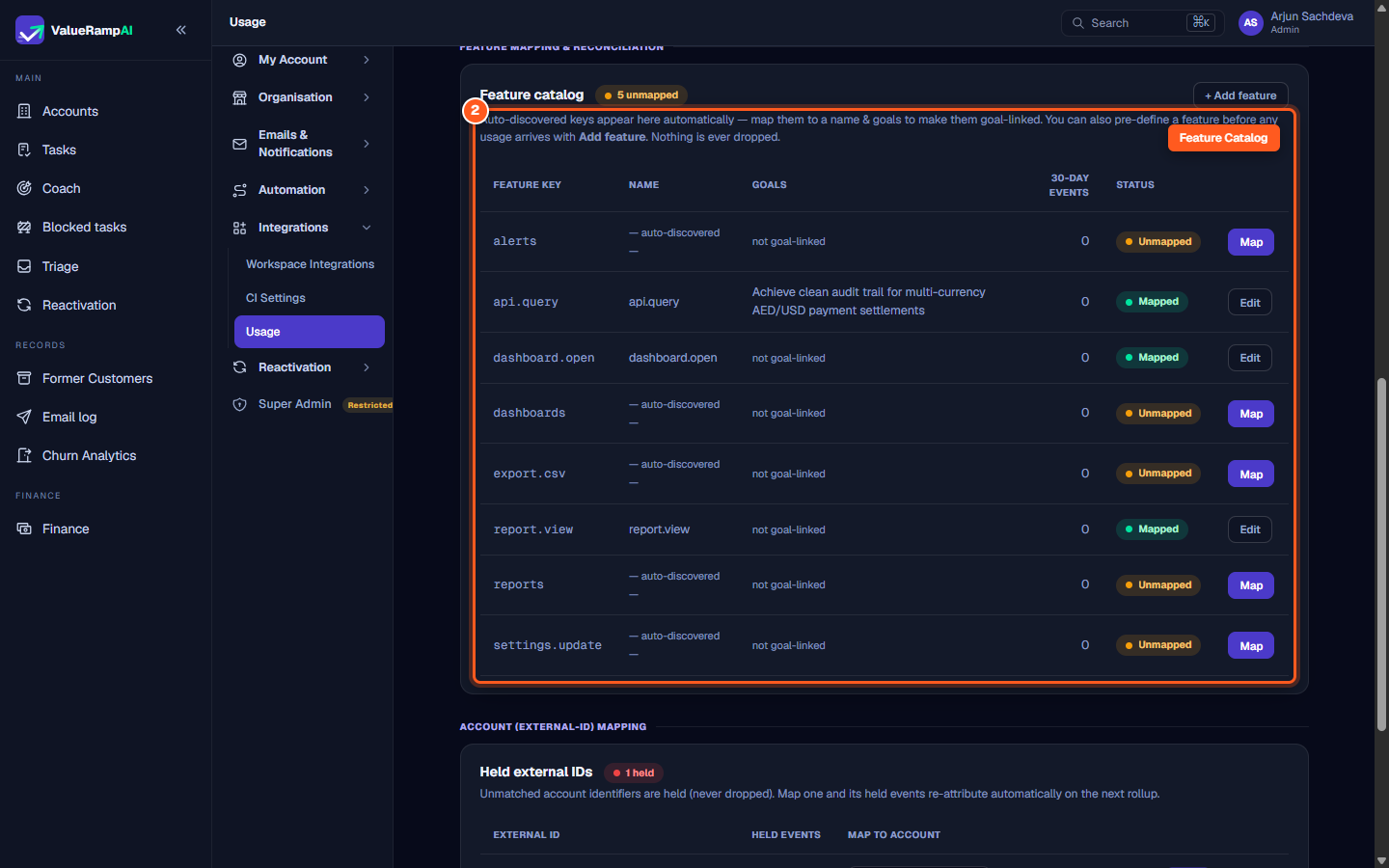
Step 2: Review auto-discovered event keys in the Feature catalog
- Scroll down to the Feature Mapping & Reconciliation card.
- ValueRamp's ingestion engine automatically registers newly discovered event keys in the Feature catalog.
- Review the table columns:
- Feature Key: The raw event identifier received from telemetry (e.g.
alerts,export.csv,dashboard.open). - Name: The human-readable name displayed across CS dashboards.
- Goals: Active customer goals linked to this feature.
- 30-Day Events: Total event volume recorded across the workspace in the last 30 days.
- Status: Marked as Mapped or Unmapped.
- Feature Key: The raw event identifier received from telemetry (e.g.
- Click Map next to an unmapped key to give it a descriptive name and link it to relevant customer adoption outcomes.
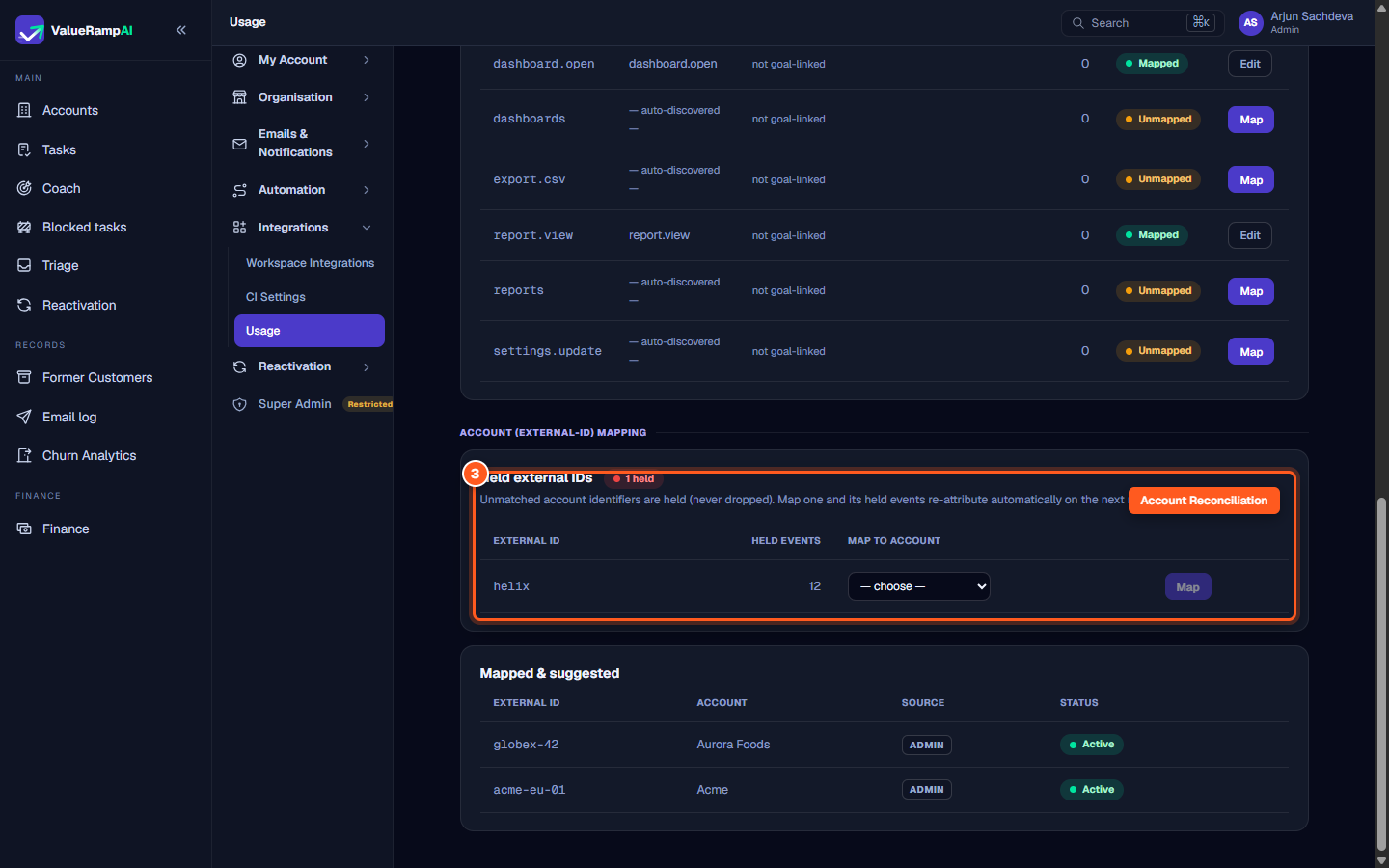
Step 3: Map held external account identifiers to customer accounts
- Scroll down to the Account (External-ID) Mapping card.
- If your product telemetry emits external tenant keys that have not yet been associated with a ValueRamp customer record, they appear under Held external IDs.
- ValueRamp holds these events safely so that zero telemetry is lost during onboarding.
- To attribute held events:
- Locate the unmapped row (e.g. external ID
helixwith held events). - In the Map to account column, open the dropdown and select the corresponding ValueRamp account (e.g. Helios Health or Helix Robotics).
- Click the purple Map button.
- Locate the unmapped row (e.g. external ID
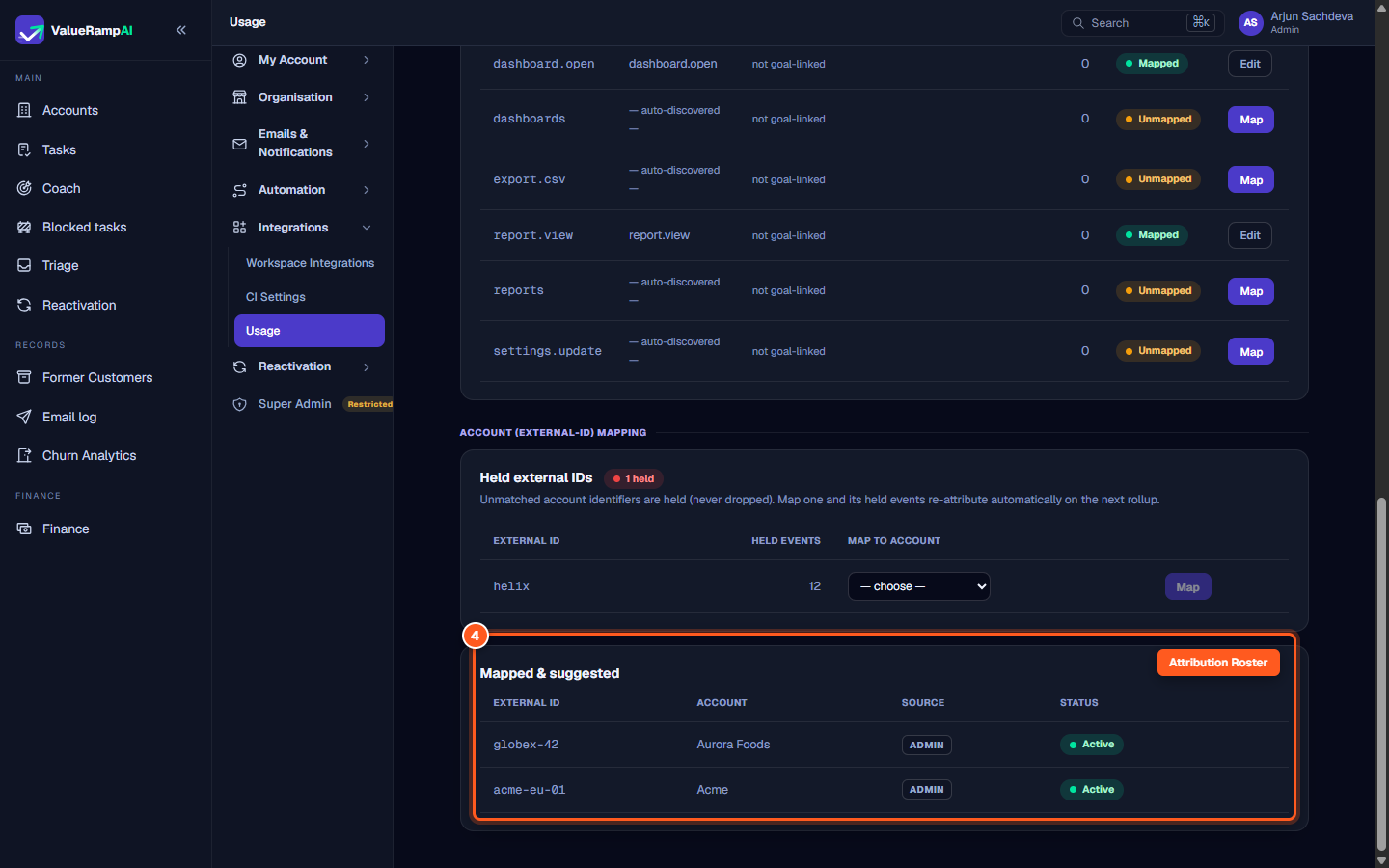
Step 4: Verify active account attribution in the Mapped and suggested table
- Immediately below the held table, inspect the Mapped & suggested roster.
- Confirm that the external ID is now listed with:
- External ID: The product telemetry key.
- Account: The attributed ValueRamp customer account.
- Source: The attribution mechanism (e.g.
ADMIN). - Status: Marked as Active.
- ValueRamp automatically re-attributes all previously held events and routes all future telemetry for this identifier directly to the target account.
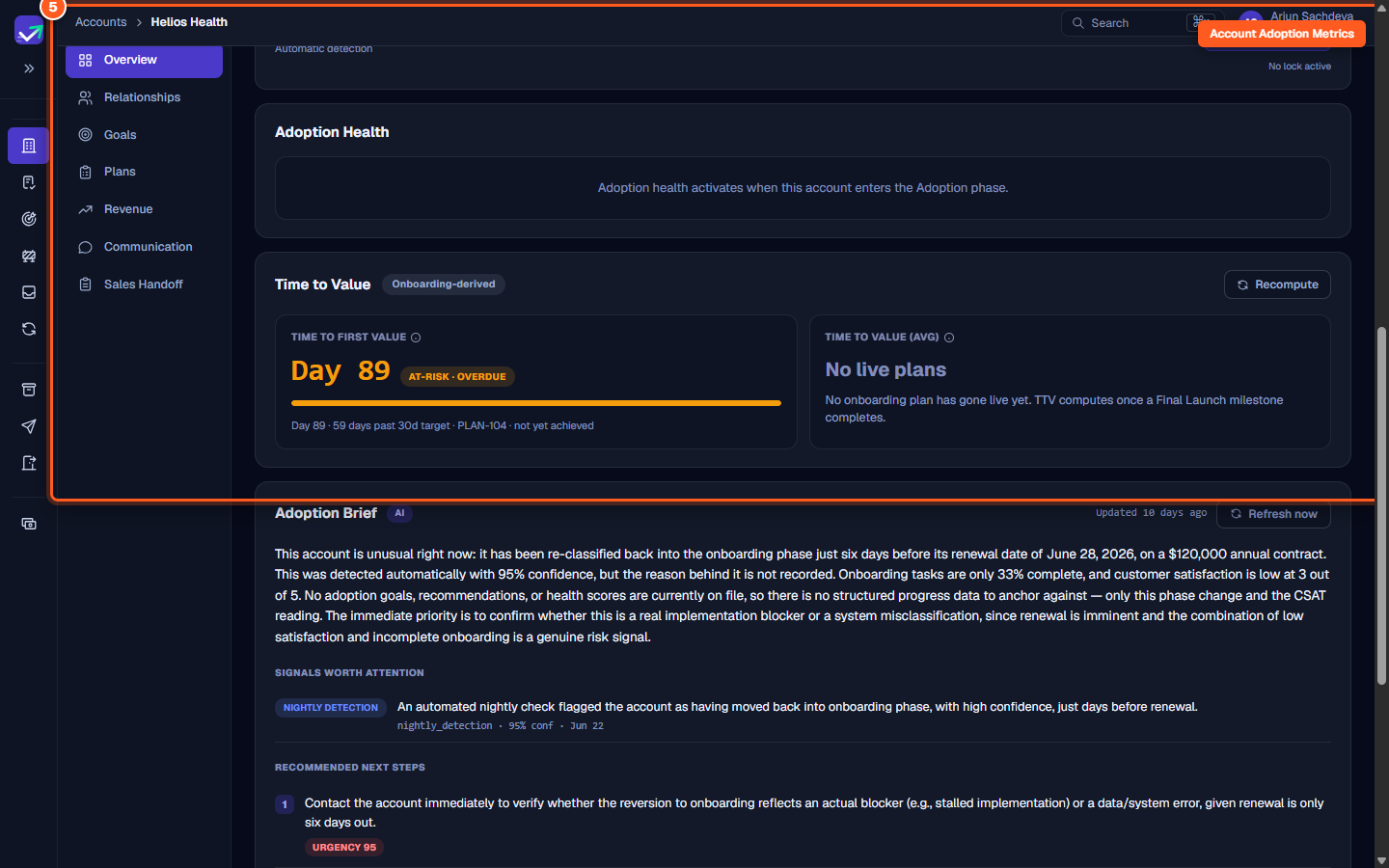
Step 5: Track attributed product usage across Adoption Health and Time to Value
- From the main navigation, open Accounts and select the mapped customer account (
/accounts/[id]). - Scroll through the account overview to evaluate usage-derived signals:
- Adoption Health: A score from recency of use, breadth of mapped features used, and event volume, computed once the account enters the Adoption phase.
- Time to First Value (TTFV): The days from the onboarding plan's start to the value milestone recorded on that plan.
- Adoption Brief: ValueRamp's AI analyzes telemetry trends to summarize customer usage patterns, highlight adoption risks, and recommend proactive CSM interventions.
Frequently asked questions
Are usage events lost if an account external ID is not yet mapped?
No. ValueRamp's zero-drop ingestion buffer holds unmatched events under Held external IDs. The moment you map the external ID to an account, all held historical events are re-attributed on the next scheduled rollup.
How often does ValueRamp calculate usage rollups?
Database connections and CSV drops run on their scheduled sync cadence (such as hourly or nightly). Real-time Ingest API events land immediately, and adoption metrics roll up nightly during automated lifecycle processing.
Can an external ID be remapped to a different account?
Yes. Map the same external identifier again from the held-IDs table, choosing the correct account — the new mapping replaces the old one, and subsequent rollups reflect the updated attribution. A mapping cannot be deleted outright.
Steps
Review connected usage sources and database connections in Usage Ingestion
Review auto-discovered event keys in the Feature catalog and map unmapped features
Map held external account identifiers to ValueRamp customer accounts
Verify active account attribution in the Mapped and suggested table
Track attributed product usage across Adoption Health and Time to Value
Was this helpful? Tell us what was missing